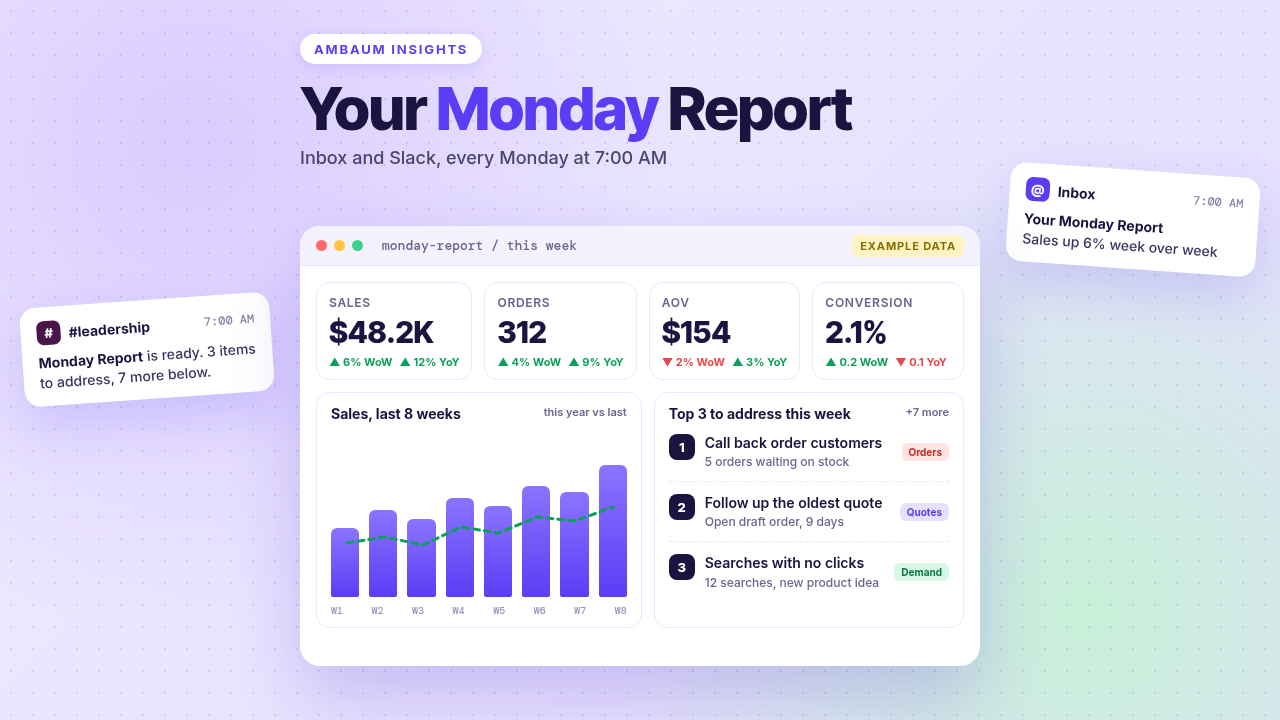
Most Shopify merchants we work with can find any number they want. The trouble is that nobody looks until something breaks. A Monday report fixes that: one message in your team's inbox and Slack at 7am, with the three things to do this week on top and the numbers that explain them underneath. It is the same idea as our AI token spend dashboard, pointed at sales instead of AI spend.
Here is what goes on it, how we build it with tools most stores already have, and where the custom work starts.
What lands at 7am on Monday
One glance, and everyone knows where the week starts. The short version goes to email and a Slack channel. The full version lives on an internal company page, so anyone can click through to the detail.
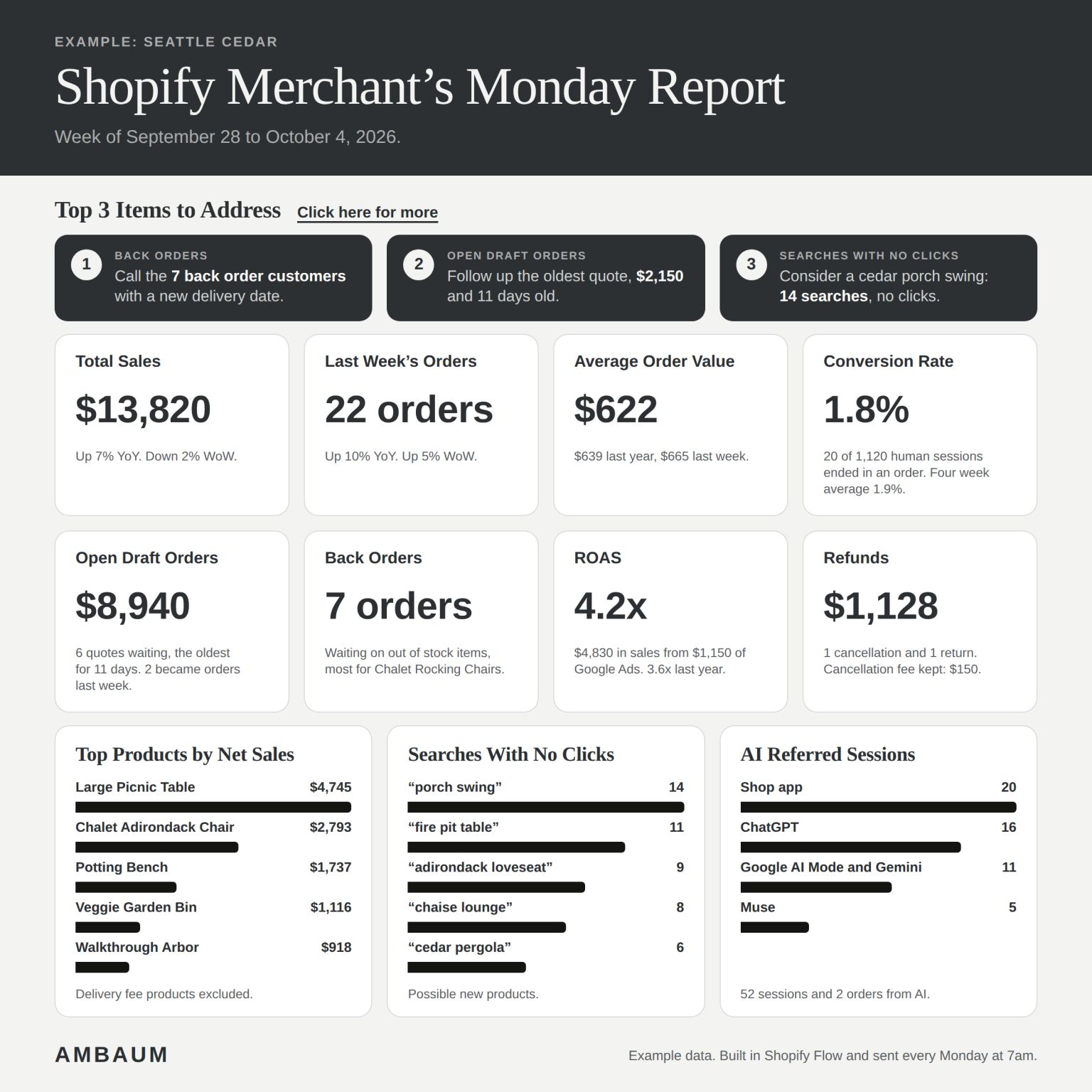
Four sections, in this order: Top 3 items to address, Sales, Operations, and Demand. Take the example above: a cedar outdoor furniture store, week of September 28 to October 4, 2026. Every number on it is example data.
Top 3 items to address
The top of the report is not a metric. It is a to-do list. In the example: call the 7 back order customers with a new delivery date, follow up the oldest quote ($2,150, 11 days old), and consider a cedar porch swing, because 14 searches for “porch swing” got no clicks. Seven more items wait below if the team gets through the top three.
Each item links to the orders, quotes, or searches behind it. That is the rule: an item without a link is a fact, not an action.
Sales: four numbers, two benchmarks
Total sales, orders, average order value (AOV), and conversion rate, each benchmarked against last year and last week. In the example: $13,820 in sales (up 7% year over year, down 2% week over week), 22 orders, a $622 AOV against $639 last year and $665 last week, and a 1.8% conversion rate on human sessions.
Two benchmarks matter because they answer different questions. Last week tells you whether something just broke. Last year tells you whether the business is actually growing, with seasonality taken out.
Here is the catch on conversion rate
Shopify changed how it measures sessions between September 21 and 23, 2026. Sessions now continue past midnight UTC, some sessions without a pageview are counted, and identified bots are filtered out by default. Your conversion rate can move even when orders did not. Per Shopify's session measurement update, bot classification only applies to sessions from October 7, 2025 on, so year over year session comparisons sit right on that edge this month. Our advice: put a note on the report, keep the same Human or bot session filter on both periods, and lean on orders and sales when the two disagree.
Operations: draft orders, back orders, ROAS, refunds
This is the money that is already in motion. Open draft orders are quotes waiting on a customer. In the example, $8,940 across 6 quotes, the oldest 11 days old, and 2 became orders last week. For B2B and high ticket stores, this line alone can pay for the report.
Back orders need a definition first. Shopify has no back order status of its own. If you keep selling when out of stock, or run a pre-order app, you end up with unfulfilled orders on items you do not have. Decide what counts, and the report can find them every week.
ROAS (return on ad spend) comes from Google Ads in the example, and you can add Meta and any other ad source. In the example, 4.2x: $4,830 in sales from $1,150 of Google Ads. Refunds round it out: in the example, $1,128 from one cancellation and one return, with a $150 cancellation fee kept.
Demand: top products, searches with no clicks, AI referrals
Top products by net sales is the obvious one. The other two are where the report earns its keep.
Searches with no clicks is a built in Shopify Analytics report. It lists search terms that returned results nobody clicked. Sometimes that is a naming problem (your product says “glider,” your customer types “porch swing”). Sometimes it is a product you do not carry yet. Check the titles first. If the products really are not there, you have a short list of possible new products. One timing note: Shopify says search data can lag up to 72 hours, so a 7am Monday report will undercount the weekend. We compare weeks on the same lag.
AI referred sessions show which assistants are sending you traffic. Per Shopify's own guidance on measuring AI traffic, you can filter reports by AI answer engines under Referrer Channel (for Gemini, filter Referrer Host for gemini.google.com). Shopify also reported that AI chatbot referral sessions grew more than 8x year over year on Shopify storefronts as of Q1 2026. Treat your number as a floor, since some AI app clicks arrive without a referrer and land in direct. We covered why this traffic deserves its own line in AI eCommerce Reports 2026, and what the assistants actually read in our agentic product rewrites piece.
How it is built: four sources
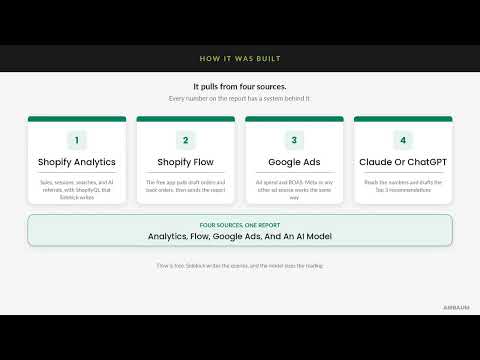
- Shopify Analytics. Sales, sessions, searches, and AI referrals, pulled with ShopifyQL that Sidekick writes. In Analytics, open a new exploration, describe the report in plain language, and Sidekick writes the query. Custom explorations are available on all Shopify plans. Reports can also group by metaobject fields now, which we covered in our September 2026 changelog review.
- Shopify Flow. The free app runs the schedule. A Scheduled time trigger fires at 7am Monday, Get draft order data pulls open quotes, and Send internal email and Send Slack message deliver it. Since May 2026, Flow's Get analytics data action can run that same ShopifyQL inside the workflow, so the numbers and the operations data travel together.
- Google Ads. Spend and ROAS. Shopify's analytics data includes channel reported ad spend and sales for marketing apps that report back to Shopify. When you want Google's own numbers, or Meta's, that is a direct integration.
- Claude or ChatGPT. The model reads the numbers and drafts the Top 3 recommendations.
Where native ends and custom work starts
Everything in steps 1 and 2 is native and needs no code. The rest is a build:
- The AI step. Flow has no built in action that calls Claude or ChatGPT. Flow's Send HTTP request action can, but it is only on the Grow, Advanced, and Plus plans, and Flow waits a maximum of 30 seconds for a response. That is why the model step often lives in a small service that reads the numbers, drafts the Top 3, and hands the result back.
- Ad data from outside Shopify, when the channel does not report it back.
- The back order definition for your store.
- The internal report page and the links from each item to its orders, quotes, or searches.
- AI drafted follow ups with a review step.
None of it is exotic. It is plumbing, and it is the part most teams never get to.
Taking action: start with the Top 3
The report only works if Monday morning turns into Monday actions. Each Top 3 item links straight to the orders, quotes, or searches behind it. AI drafts the customer emails and the quote follow ups. Your team reviews and sends.
That review step is not optional. It is the same drafted, checked, sent trail we recommend in the AI token spend dashboard, and it is how you learn which drafts go out as written and which ones your team keeps fixing.
What to check this week
- In Analytics > Reports, open Searches with no clicks for the last 30 days. For the top three terms, decide: naming problem or product gap?
- Open Sessions by referrer and filter Referrer Channel for AI answer engines. Write down this week's number as your baseline.
- Count your open draft orders and find the oldest. Ask who owns the follow up.
- Write one sentence that defines a back order for your store.
- Build one Flow: Scheduled time (Monday, 7am), Get draft order data (open drafts), Count, then Send Slack message. Shopify has a template for the daily version.
- If you share a conversion rate chart, mark September 21 to 23, 2026 on it.
At Ambaum we build AI reports that consolidate the information your company needs to increase sales. If you want a Monday report of your own, or a second set of eyes on the one you have, reach out.
No pitch. No pressure. Just perspective.
Read the full transcript
As a Shopify merchant, you should start every Monday knowing your key performance metrics. Here is the Monday report we build and what is on it.
It lands in your team's inbox and Slack at 7 every Monday morning, and the full version lives on a company internal page. One glance, and everyone knows where the week starts.
At the top, the items to address this week: back orders to call, the oldest open quote to follow up, and a search with no clicks that might be a new product. Seven more wait below if you get through the top three.
Then sales and operations: total sales, orders, average order value, and conversion rate, each benchmarked against last year and last week. Below that, open draft orders, back orders, return on ad spend, and refunds. And demand: top products by net sales, searches with no clicks, which are possible new products, and AI referred sessions, broken out by which assistant sent them.
How was it built? Four sources. Shopify Analytics for sales, sessions, searches, and AI referrals, with queries Sidekick writes. Shopify Flow pulls draft and back orders and sends the report. Google Ads for spend and return on ad spend, and Claude drafts the top three.
How do you take action? Start with the top three. Each item links to the orders, quotes, or searches behind it. AI drafts the customer emails and the quote follow ups, and your team reviews and sends them.
At Ambaum, we build AI reports that consolidate the information your company needs to increase sales. Reach out if you want a Monday report of your own.