Yesterday we covered the five Fall '26 updates every merchant should act on in our Shopify Fall 2026 Editions recap. Today we sat through Shopify's partner session, Shopify Editions Fall '26: Unpacked, and read it with one kind of store in mind: auto and parts brands. Aftermarket, OEM-replacement, accessories, B2B shop accounts, and catalogs where one wrong year or trim means a return. These are the seven updates we would act on, in order, with the caveats Shopify's own docs attach to them.
1. Up to 20 barcodes per variant
Per Shopify Help, you can now add up to 20 barcodes to a product or variant, so codes from different suppliers, regions, or marketplaces can all point at the same item. Each barcode carries a type, such as GTIN, UPC, ISBN, or Custom. If a value is registered with GS1, Shopify sets the type to GTIN automatically, and if your product name and vendor do not match the GS1 listing, the admin shows a warning. In Shopify POS, staff can find a product by scanning or searching any of its barcodes or its SKU.
Why parts sellers should care: a single brake pad set can carry the manufacturer UPC, a distributor code, and the number a counter guy actually types. Until now most stores picked one and pushed the rest into metafields or tags. Now the codes live on the variant, can be scanned in POS and the warehouse, and can be loaded through the bulk editor or CSV.
Here is the catch. Barcodes are identifiers, not fitment. Adding an interchange or superseded part number as a Custom barcode helps staff and scanners find the right SKU. It does not tell an agent which vehicle the part fits. And a GS1 mismatch warning is a prompt to check your data, not proof that you own the code.
Admin path: Products › a product › Variants › select variants › Edit barcodes.
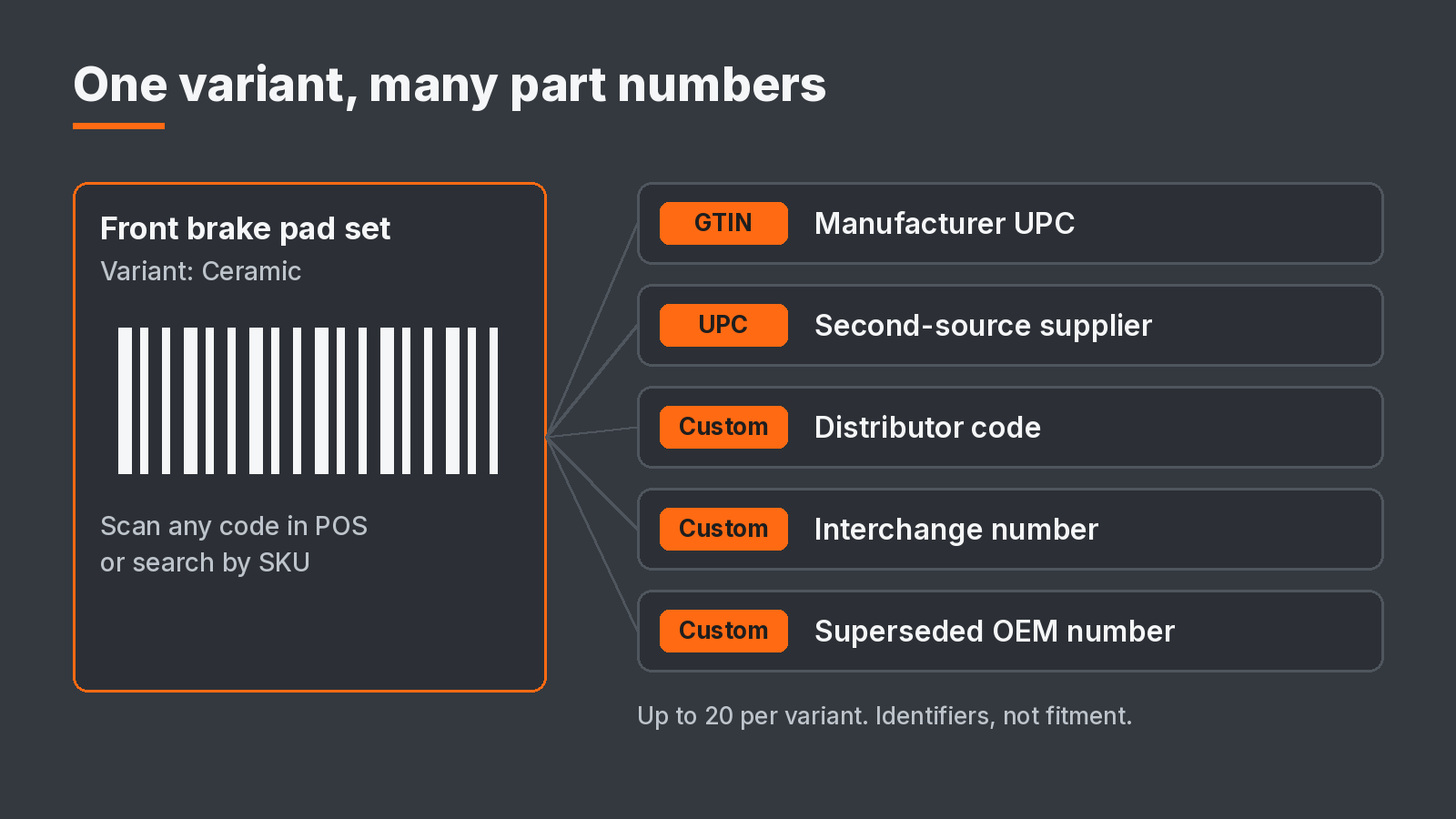
Up to 20 barcodes per variant. Identifiers, not fitment.
2. Native checkout fields for VIN, PO number, and install date
Shopify Help confirms custom fields are coming to the checkout and accounts editor. The timing matters: Shopify says they are not available yet and will not be released before or during BFCM, so your checkout will not change during peak. When they arrive, they are added automatically. There is no early access.
Each field is linked to an order metafield, and the customer's answer saves to that order. On Shopify Plus you get text fields, text areas, choice lists, date pickers, and checkboxes. On other plans you get only Delivery instructions and Gift message. Fields can be required (except checkbox, delivery instructions, and gift message), and you can show a field only when the cart contains products from specific collections.
For parts, that is the VIN field that only appears when an ECU, key fob, or OEM-replacement module is in the cart, a PO number field for shop accounts, or an install appointment date. Two limits to plan around. Custom fields collect information for the whole order, not per line item, so one VIN per order is the realistic model. And Shopify notes that making a field required can reduce checkout conversion, so require the VIN only where a missing VIN actually costs you a return.
One more reason to move off app-based fields when these land: Shopify says built-in custom fields work in direct checkout on agentic storefronts such as Google AI Mode, Gemini, and Microsoft Copilot, while fields added by a checkout app might not display there.
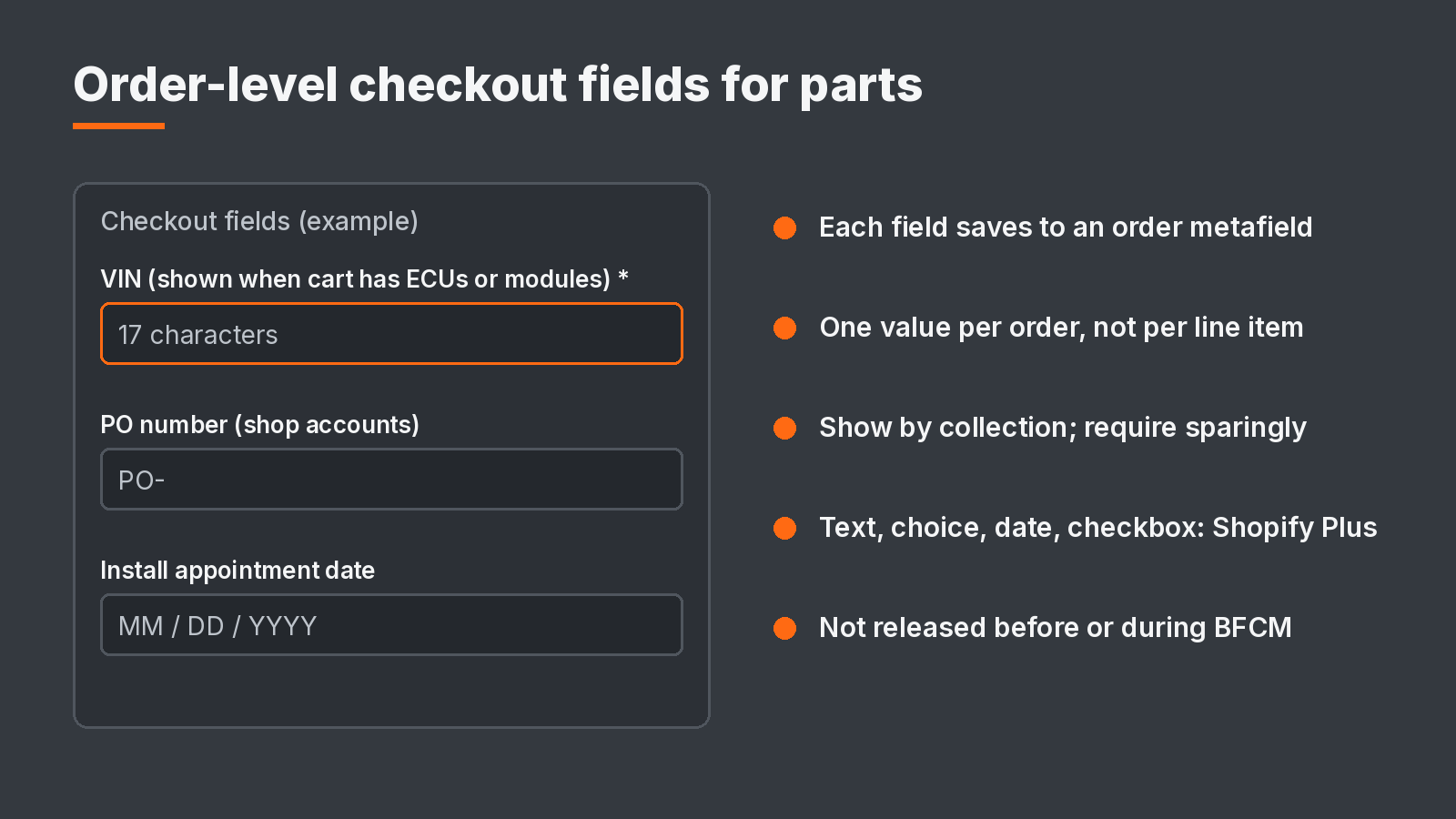
Order-level custom fields for parts checkouts. Example only, not a Shopify screenshot.
3. Knowledge base: the store facts agents quote back
The knowledge base now lives at Sales channels › Agentic › Knowledge Base and replaces the Shopify Knowledge Base app, which Shopify says is deprecated on January 15, 2027. Shopify scans your storefront and admin and drafts facts in categories like Company policies, Returns & warranty, Fulfillment, and Second hand. Scanned facts stay unpublished until you publish them. Facts linked to your admin, such as policies and contact details, are published when Shopify creates them. The cap is 1,000 facts.
Here is the number most merchants will skim past: your published knowledge base is publicly available through the Storefront MCP to Shop and third-party AI channels. Whatever is in there is what an agent says when a buyer asks about your returns.
For parts sellers, the scan will not find most of what matters. Use Additional facts (Paragraph, Yes/No, or Tags) for:
- Core charges and core return windows
- Fitment disclaimers and what to do before ordering (VIN check, call before ordering)
- Restocking fees on electrical or special-order parts
- Freight, oversize, and liftgate terms
- Hazmat shipping limits (batteries, aerosols, fluids)
- Emissions and CARB legality by state (see our California SB 1069 post)
- Used, remanufactured, or open-box condition (the Second hand category)
Shopify says it never changes knowledge base content without your approval and that a rescan can take up to 48 hours.
4. What agents now read from your catalog
Shopify's Editions page says the Catalog API now returns sale prices and safety warnings with every product, and can filter to products with 3D models or video. The September 15 developer changelog confirms video and 3D media now return on products, with a media filter, for agents on the draft Catalog extension. Shopify also lets you give AI shopping agents your compare-at price through Shopify Catalog, and on the buyer side, Shop Pay now works inside personal AI agents for purchases from brands on or off Shopify.
In its partner briefing, Shopify said the key prep for Shop Pay in agents is strong catalog data, accurate policies, and an agent-ready store setup. Shopify also said surfaces control how compare-at pricing is displayed, so verify it per channel rather than assume.
The uncomfortable part for parts: none of this changes what we wrote in Shopify Auto Parts Returns Are a Fitment Data Problem. The agent-facing catalog still reads text fields, not your fitment metafields. More agents with checkout power on thin fitment text means more confident wrong orders. Make sure Prop 65 and other safety warnings are present where they apply, that sale pricing is real, and that year, make, model, and exclusions are in the text the agent reads. Then test your store with an AI shopping agent.

What reaches the agent, and what does not unless you put it in text.
5. Shipping options by market: rates stop stacking
Shipping options by market replace shipping profiles, managed from Markets. Per Shopify Help, when more than one rate in a shipping option applies to a cart, only the single highest matching rate applies at checkout instead of the rates being added together. It is in early access for certain stores and rolls out gradually. Until your store is upgraded, you keep using shipping profiles.
For a parts catalog with a freight profile for bumpers and exhausts, an oversize profile for wheels, and a standard profile for everything else, this is a real behavior change. Today a mixed cart can stack rates. After the upgrade, the highest matching rate wins. That can fix overcharging on mixed carts, and it can also under-recover freight if your oversize surcharges were counting on stacking. Model your top 20 mixed carts before you accept the upgrade. In the partner briefing, Shopify also advised validating shipping app compatibility before adopting.
6. Plain-language fraud reasons on high-ticket parts
Shopify Protect, announced October 28, says every order that comes through now carries a plain-language explanation of its risk and the reasons behind it. Near-certain fraud is declined before it reaches the bank. The new Shopify Protect: Rule Builder app lets you block, request 3D Secure, or hold for review on signals you choose, and preview a rule against your past 90 days of orders before it goes live. Shopify says Protect is on for every business on Shopify Payments.
Turbos, ECUs, wheel sets, and diagnostic tools are resale-friendly, which makes parts stores a target. The reason text helps whoever decides whether to ship a $2,400 order at 4:45 PM make that call without guessing. In the briefing, Shopify said the explanations come from the same signals as the underlying fraud model and do not change how risk is classified. So treat it as better visibility, not a new filter. If you want a new filter, backtest a rule first.
7. Parts ops plumbing: counts, events, and permissions
Three back-office updates matter for multi-location parts operations and ERP-connected stores:
- Stock counts. Inventory › Stock counts lets you schedule counts by location, scan or enter quantities, and have a manager approve before levels change. Every approved difference lands in adjustment history. At POS Pro locations, staff can count in the POS app. In the partner briefing Shopify positioned this as replacing Stocky count workflows, focused on counts and auditability, not bin allocations.
- Versioned Events. Shopify's Events subscriptions set an api_version in the app config and cover 18 topics, including products, companies, orders, fulfillment, and inventory. In the briefing, Shopify said this is meant to stop unannounced payload changes from breaking middleware, ERP, and fulfillment integrations. Ask your ERP or WMS connector vendor when they move.
- Permissions and access. Flow now uses admin roles and permissions to control who can view, edit, and activate workflows. A filterable store-wide change log is listed as coming soon. Shopify's developer docs also add per-app IP allowlists, so a leaked custom app token cannot be used from an unlisted address. In the briefing, Shopify said IP restrictions are not a replacement for secret management and least-privilege access.
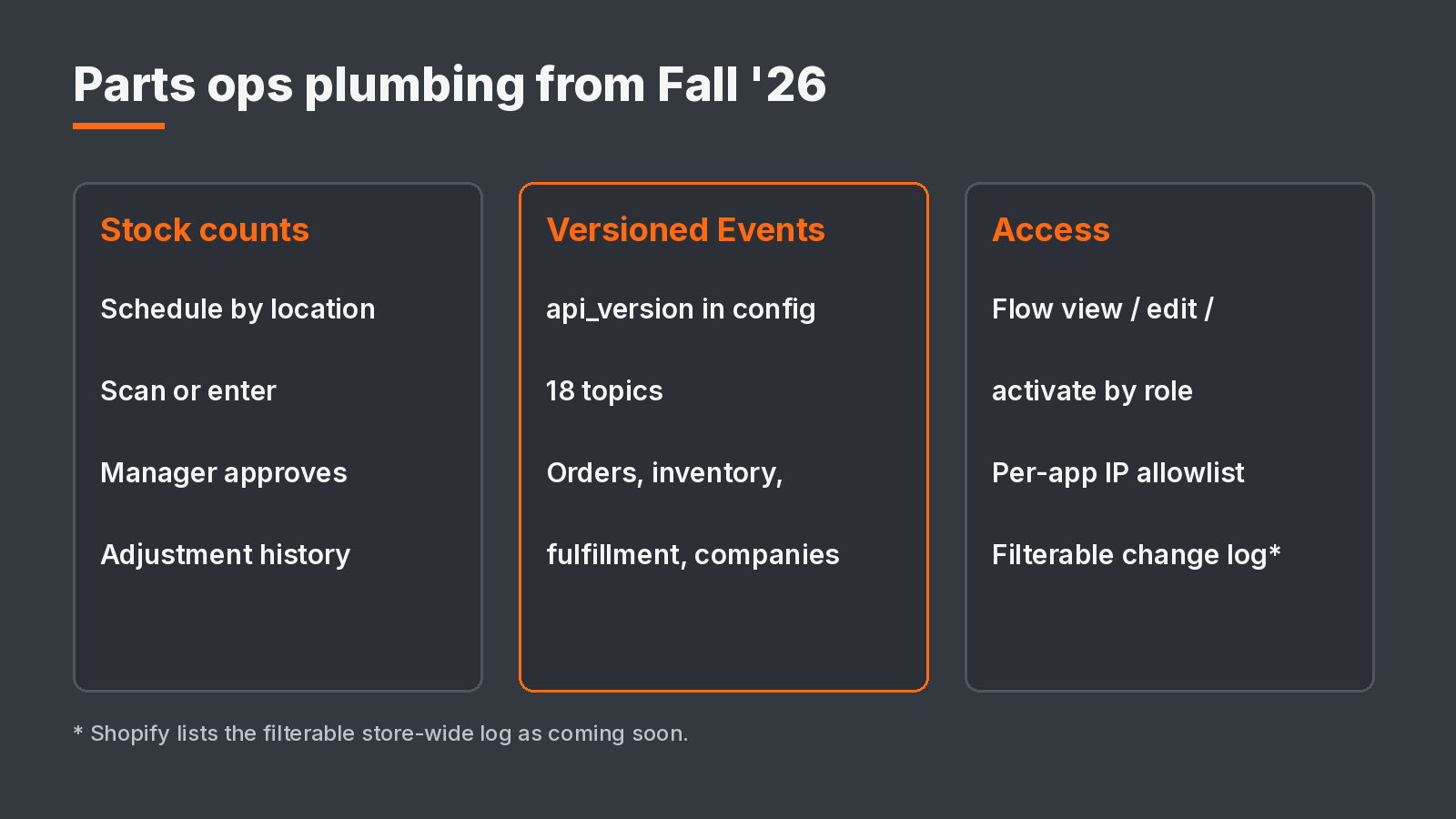
Fall '26 back-office updates for parts operations.
Auto and parts checklist
- Pick your barcode standard: manufacturer UPC or GTIN first, then distributor and interchange numbers as typed barcodes. Fix GS1 mismatch warnings on top sellers.
- Write down the checkout fields you want (VIN, PO number, install date), which collections trigger them, and which are required. Build them after BFCM when Shopify releases them.
- Open Sales channels › Agentic › Knowledge Base. Review every scanned fact, then add core, freight, hazmat, restocking, and emissions facts.
- Spot-check five high-return SKUs: sale price, safety warning, and fitment text in the description.
- If your Markets admin offers shipping options by market, model mixed freight and standard carts before upgrading.
- Read the risk reasons on your last ten high-risk orders. Backtest one rule in Rule Builder before turning it on.
- Schedule a stock count at one location. Ask your ERP connector vendor about Events versioning.
- Before you compare BFCM 2026 sessions or conversion rate to 2025, read the next section.
Before you read BFCM numbers
Shopify rolled out a session measurement update from September 21 to 23, 2026. Sessions now end after 30 minutes of inactivity instead of at midnight UTC, some sessions without a pageview are counted, and identified bot sessions are filtered out by default. Orders and sales are not affected. Your conversion rate can move even if nothing about your business changed. Shopify recommends using post-update data as a new baseline. Compare orders and sales year over year, not conversion rate.
Sources
- Shopify Editions | Fall '26
- Help: Adding barcodes to products, Custom fields in checkout, Knowledge base, Shipping options by market, Stock counts, Session measurement update, Flow staff permissions, Compare-at prices in Catalog
- Introducing Shopify Protect (October 28, 2026)
- shopify.dev: Filter Catalog search results by media type (September 15, 2026), Events subscriptions and versioning, IP allowlist
- Shopify partner session, Shopify Editions Fall '26: Unpacked (October 29, 2026). Items marked as partner briefing were not confirmed in public docs at time of writing.
At Ambaum we track every Editions and changelog release so our merchants do not have to. If you run a parts catalog and want a second set of eyes on barcodes, knowledge base facts, or what an agent says about your fitment, reach out.
No pitch. No pressure. Just perspective.